
Mach Command
The CNC that runs like a hand torch.
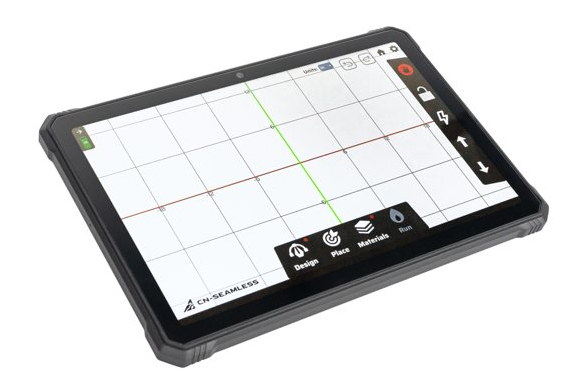
Every Mach 1 runs on Mach Command, our software, built around the exact workflow you already use with a hand torch. From steel to finished part, with no G-code, no CAD station, no weeks of training, and no subscription.
How it works
Four screens, truck to cut.
Mach Command follows the exact steps you'd take with a hand torch: design the part, place it on the steel, set the material, run the cut. Pick how your program starts, then click through the screens.
Trace the Real Part, Point 2 Point
Guide the scribe tool of the Mach 1 to the points on your real part, transferred drawing, or template. Enter these points as lines or arcs as you go to create parts directly from true dimensions. Save traced P2P files and nest duplicates if you need more than 1.
Getting your part in
No CAD degree required.
Three ways to turn what's in your head into a cut path.
Punch in dimensions
Built-in design library: type the size of a base plate, gusset, padeye, or spacer and the tablet generates the geometry.
Trace it Point 2 Point
Arc and Line segments traced over the real part or a template, right on the plate. No measuring-and-hoping.
Drop a DXF
Load a DXF or CAD file straight onto the tablet and cut it, complex multi-part packages included.
Whichever way it goes in, the program is saved. The second, tenth, and hundredth copy cost nothing but plate.
It grows with you
Easy on day one, deep when you're ready.
Mach Command works in two layers: the basics get you cutting right away, and the advanced tools are there the day you want them.
Day one
The basics get you cutting.
- Four screens, left to right: Design, Place, Materials, Run.
- Pick a shape from the built-in library, or drop in a DXF.
- Set material and thickness, and the right torch tip is starred and the cut settings fill themselves in.
- Run a numbered cut order; nudge the feed rate with the turtle and rabbit.
When you're ready
The depth, when you want it.
- Trace a real part Point 2 Point; group, combine, pattern and mirror shapes.
- Set your origin from the center of a hole or a stock corner; align to two points.
- Plasma probing and torch-height control; custom stock and shape lead-ins.
- Pause and rewind mid-cut, tweak materials on the fly, calibrate the arms.
Always improving
Keep your Mach 1 current.
Mach Command gets better with every build, and updates now ship through the CN-Seamless app. Prefer email? Drop yours and we'll tell you the moment a new version is ready.
The manual
The full user guide.
Every screen and every setting, start to finish: the complete Mach Command guide.
Read the user guide